Business
Influencer Industry Insights
Influencer News

Instagram Link Sticker: What It Does and What It Means for Influencers

von Angelina Zwick
May 9, 2026
Angelina ZwickLink Sticker on Instagram

Short answer: The Instagram link sticker is a sticker for Stories that links to an external website: followers tap it and land directly on the page. Since October 2021 it has been available to all accounts in principle, regardless of follower count; new accounts and accounts with repeated policy violations may be excluded. For brands and influencers, it is the most important tool for turning a Story into measurable traffic.

In brief

  • The link sticker replaced the former "swipe-up" and works in Instagram Stories.
  • According to Instagram, all accounts can use it, with exceptions for new accounts and for violations of the Community Guidelines.
  • You can customize the sticker's color and text; a short call to action works better than a bare URL.
  • You can see link taps in your Story insights; with UTM parameters you also measure them in your analytics tool.
  • In paid collaborations, the ad disclosure belongs in Stories with a link sticker too.

What is the Instagram link sticker?

The Instagram link sticker is an interactive sticker that you place in a Story and connect to a URL. When users tap the sticker, the linked page opens, for example a product in an online store, a recipe, a landing page, or a sign-up form.

Instagram introduced the link sticker as the successor to the "swipe-up" feature. Unlike swipe-up, users see the sticker directly in the Story and can interact with it like with other stickers.

Who can use the link sticker on Instagram?

In principle, everyone. On October 27, 2021, Instagram officially announced that it was expanding link sharing in Stories to all accounts. Before that, the feature was reserved for verified accounts or accounts above a certain follower count.

According to Instagram, there are exceptions:

  • New accounts: do not get the link sticker right away.
  • Accounts with violations: Anyone who repeatedly shares hate speech, misinformation, or other content that violates the Community Guidelines can lose access.

If you believe you have been restricted unfairly, Instagram says you can check this under Account Status in the app and file an appeal.

How do you add a link sticker to your Instagram Story?

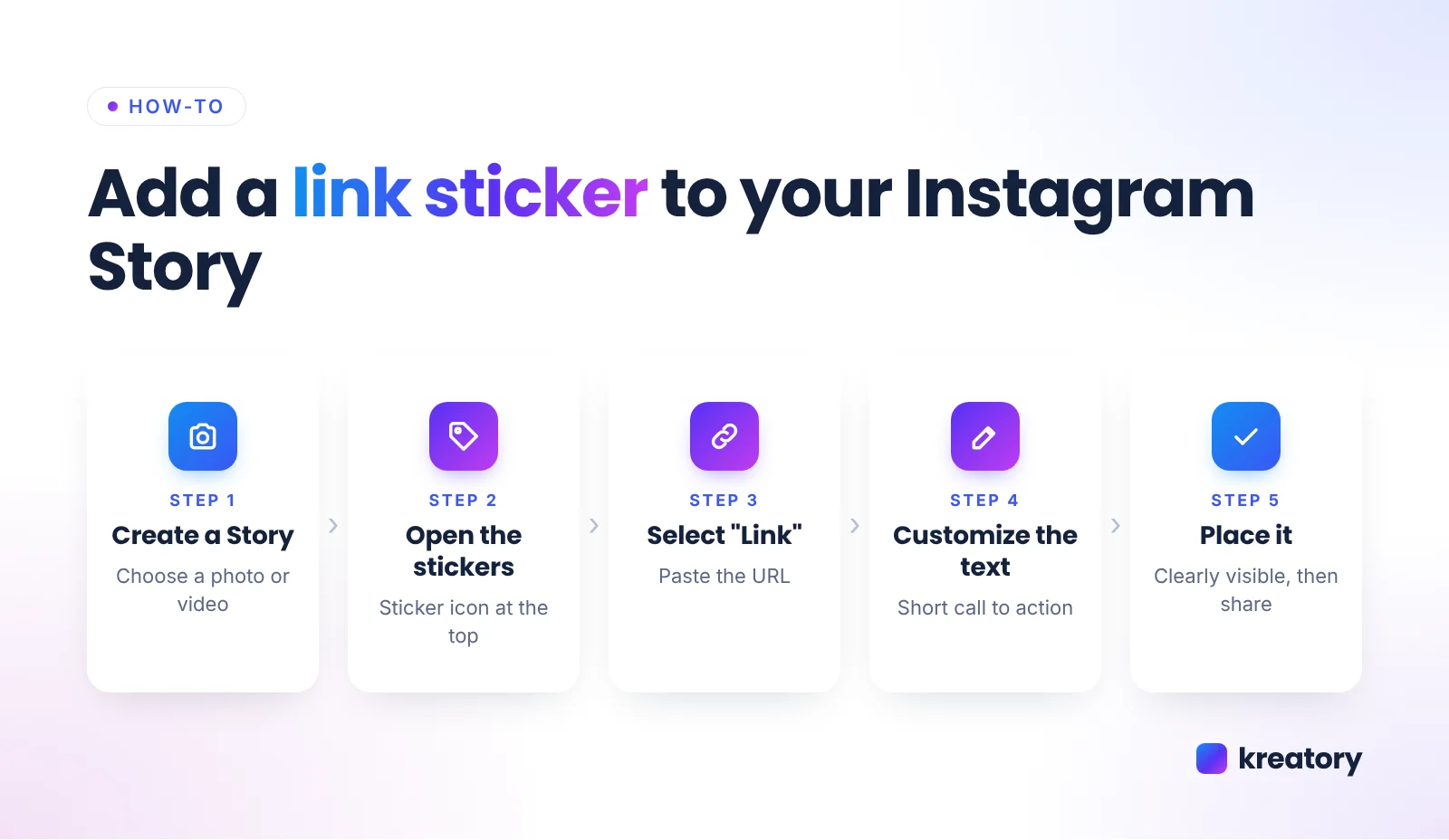
Adding one takes less than a minute:

  1. Create a Story: Take a photo or video, or upload one from your gallery.
  2. Open the stickers: Tap the sticker icon at the top.
  3. Select "Link": Paste the full URL and tap "Done".
  4. Customize the text: Where possible, replace the URL with a short call to action such as "Get the recipe" or "Watch now".
  5. Place it and share: Position the sticker where it is clearly visible, but not over the profile name or the reply bar, and tap the sticker to change its color.
How to add an Instagram link sticker to your Story in 5 steps
How to add the link sticker to your Instagram Story.

Tip: Save Stories with important links as a Highlight. That way the link stays accessible on your profile after 24 hours.

Where else can you place links on Instagram?

The link sticker is designed for organic Stories. In regular feed posts and Reels, links in the caption are not clickable. Other options:

  • Bio links: Since April 2023, according to TechCrunch, you can add up to five links to your profile bio.
  • Story Highlights: Stories with a link sticker stay permanently visible on your profile.
  • Ads: In paid Instagram ads, links are set up via Ads Manager, not via the sticker.
  • Product tags: Stores using Instagram Shopping can tag products in posts, where the feature is available.

How do you use the link sticker in influencer collaborations?

In collaborations, the link sticker turns a recommendation into a measurable click. For this to work, brand and creator should define these points in the briefing:
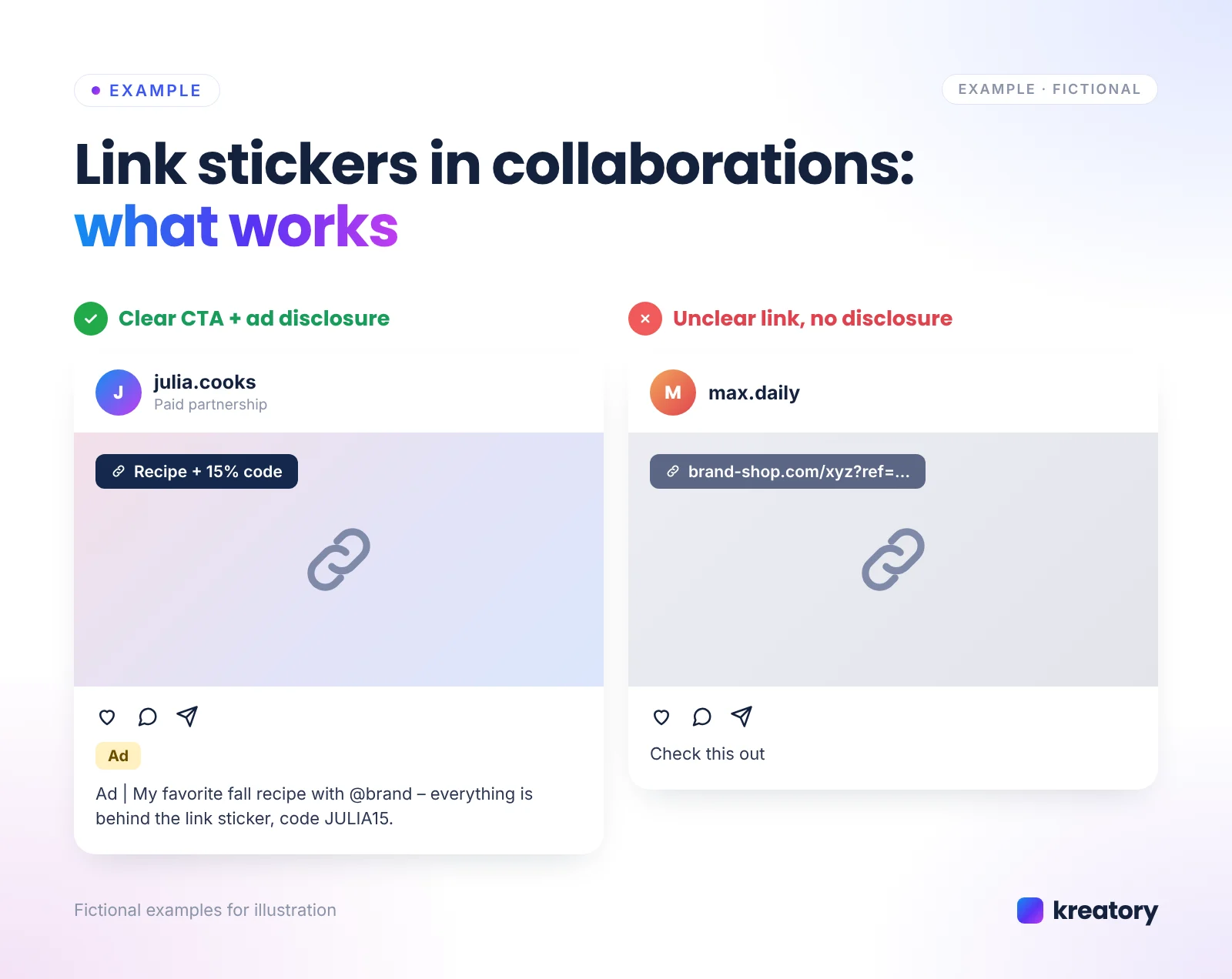
  • Clear call to action: "Recipe + 15% code" works better than a long URL.
  • Story series instead of a single Story: First show the product, then share the experience, then the link sticker with the offer.
  • A separate link per creator: With UTM parameters or individual discount codes, you attribute clicks and sales to the right creator.
  • Matching landing page: Link directly to the product or a mobile landing page, not to the homepage.
  • Ad disclosure: If the creator receives money or a product, the Story must be recognizable as advertising. In Germany, this is required by Section 5a (4) of the Unfair Competition Act (UWG), for example with a clearly visible "Werbung" (ad) label at the start; other markets have comparable disclosure rules, such as the FTC Endorsement Guides in the US. You will find details in our article on ad disclosure in influencer marketing.
Instagram Story with link sticker in collaborations: clear CTA with ad disclosure vs. unclear link without
Fictional examples: a clear CTA with disclosure works better than a cryptic link without context.

Our guide to influencer briefings shows what belongs in a good briefing; you will find ready-made templates in our briefing templates.

How do you measure the success of a link sticker?

You measure success via link taps and the click-through rate. In the Story insights you can see how often the sticker was tapped. If the creator shares the insights, you can compare Stories from different creators this way.

Click-through rate = link taps ÷ Story views × 100

Example (fictional): A Story with a link sticker gets 6,000 views and 180 link taps. The click-through rate is therefore 3%.

Formula for Instagram link sticker click-through rate: link taps divided by Story views times 100
Use this formula to compare the click-through rate of different Stories and creators.

It is also worth looking at your web analytics tool: with UTM parameters you can see how many visitors came via the Story and whether they bought. You can read which metrics matter for creator selection in KPIs for selecting the right influencers.

What to do if the link sticker is missing?

If you cannot find the link sticker, these steps usually help:

  1. Update the app: New features often only appear in the latest version.
  2. Check the format: The sticker is designed for Stories, not for feed posts or Reels.
  3. Check your account status: In the settings you can see whether features are restricted due to policy violations.
  4. Wait if your account is new: According to Instagram, new accounts do not get the sticker right away.
  5. Check the link: Instagram can block links that are classified as spam or unsafe.

How does Kreatory help with link sticker collaborations?

With Kreatory you find matching profiles for Story campaigns among more than 5.4M creators. You set up the campaign in under 10 minutes, creators send you offers, and you book with 1-click booking. You approve content before it is posted, including a check of the link and the disclosure. Reach, impressions, clicks, and CPM are tracked automatically. Barter deals with a product instead of a budget are possible too; read more in Barter deals with influencers.

Want Story campaigns with measurable clicks? Register for free now and find matching creators.

FAQ about the Instagram link sticker

How many followers do you need for the link sticker?

No specific number. Since October 2021, according to Instagram, all accounts can in principle share links in Stories. Exceptions are new accounts and accounts with repeated violations of the Community Guidelines.

Can I use a link sticker in Reels or feed posts?

No. The link sticker is designed for Stories. In posts and Reels, links in the caption are not clickable; use the bio links or a Story Highlight instead.

Can I change the text of the link sticker?

Yes. When creating it, you can enter your own text and change the color by tapping it. A short call to action makes it easier to understand.

Where can I see how often the link sticker was tapped?

In the insights of the respective Story. For more detailed analysis, also use UTM parameters in your analytics tool.

Does a Story with a link sticker have to be labeled as an ad?

If the creator receives something in return for the Story, whether money or a product, usually yes. The disclosure should be clearly visible at the start. This article does not replace legal advice.

10 Success Stories for Free

👉 Want deep insights into influencer marketing & UGC sourcing and curious about our success stories?📈


Download 10 success cases for free now 👇
Thank you! Your submission has been received!
Oops! Something went wrong while submitting the form.
This site is protected by reCAPTCHA, and the Google Privacy Policy and Terms of Service apply.

Influencer Marketing & UGC Sourcing